Use slow motion proactively, not reactively — the Space key's slow-motion effect is most valuable when deployed just before a dangerous gap, not at the moment of crisis. Identifying that a gap is about to become critical and activating slow motion during the approach gives you more navigation time. Activating it at the last moment gives less benefit than using it a second earlier.
Camera view selection affects your forward visibility — the C key cycles through camera perspectives. Experiment with available views to find the one that gives you the most useful forward visibility for the current environment and mode. A higher camera angle typically shows more of the road ahead; closer views provide better lateral traffic awareness.
Nitro on clear sections, not through traffic — the F key's nitro boost increases speed beyond normal maximum. Using it in clear road sections generates maximum distance from the burst; using it through dense traffic increases collision risk at a speed you can't control. Reserve nitro for sections where traffic density is low enough that the additional speed doesn't compromise collision avoidance.
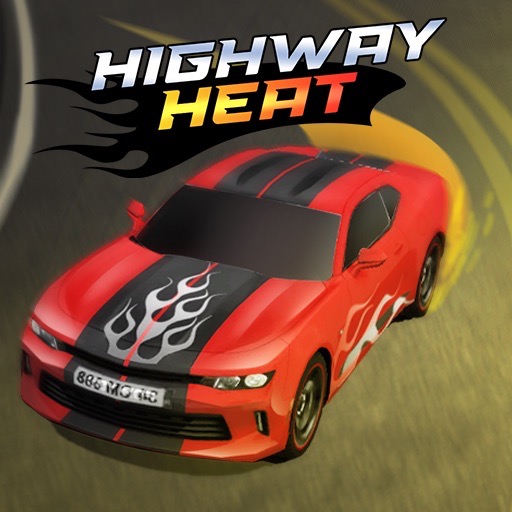
Highway Heat
Play Highway Heat online free at racing-limits.io. Jump into instant browser gameplay with no downloads.
Highway Heat is a traffic racing game that distinguishes itself through two specific additions to the genre standard: a slow-motion mechanic that can be activated during dangerous situations, and a four-environment roster — Village, Winter, Desert, and City — each with distinct visual character and traffic behavior. These two features together give the game a tactical dimension that pure reflexes-only traffic games don't provide. The slow-motion button (Space) is not a cheat; it's a legitimate tool that converts a split-second reaction requirement into a manageable navigation decision, at the cost of the time it takes to activate and the situational awareness required to deploy it well.
The environment variety keeps sessions visually and mechanically fresh in ways that single-track traffic games can't sustain. Village, Winter, Desert, and City each have distinct road geometries, traffic densities, and visual atmospheres — the Winter environment's narrower visual range and cold palette feels different from the Desert's open vistas, which feels different from the City's denser infrastructure. Each environment combined with the mode options (One Way, Two Way, Time Attack, Free Ride) creates a session variety that sustains engagement across many play sessions.
The vehicle roster and upgrade system provide the long-term progression motivation. More than 10 unlockable cars span a performance range where the most expensive models offer meaningfully different top speeds, acceleration, and handling characteristics — not just better numbers but a genuinely different driving experience on the same traffic-filled roads. Highway Heat has the ambition of a complete traffic racing package.
Key Details:
Genre:
Traffic Navigation / Highway Racing
Difficulty Level:
Easy–Hard (varies by mode and environment)
Average Play Time:
15–30 minutes per session
Best For:
Players who enjoy traffic navigation games with multiple environments, mode variety, slow-motion tactical tools, and meaningful vehicle progression
How to Play Highway Heat?
Getting Started:
Press W or Up Arrow to accelerate — build speed to navigate traffic efficiently.
Use A/D or Left/Right Arrow keys to steer between vehicles — read gaps ahead and position before they arrive.
Press S or Down Arrow to brake when traffic closes or when a dangerous situation requires controlled approach.
Press Space to activate slow motion during dangerous situations — buy yourself additional navigation time when a gap is closing faster than normal reaction allows.
Press F to activate nitro boost for additional speed bursts during clear sections or Time Attack mode pushes.
Basic Controls:
Key
Action
W / Up Arrow
Accelerate
S / Down Arrow
Brake
A / Left Arrow
Steer Left
D / Right Arrow
Steer Right
Space
Slow Motion
F
Nitro Boost
C
Change Camera View
Objective: Navigate traffic-filled roads as far as possible without crashing (One Way, Two Way, Time Attack modes). Complete missions and challenges for coins. Avoid collisions — crashes end runs instantly in competitive modes. Earn coins for vehicle unlocks and upgrades.
Highway Heat Game Features & Highlights
Slow-motion mechanic — Space key activates time dilation during dangerous situations, converting reaction-speed demands into navigation decisions
Four distinct environments — Village, Winter, Desert, and City each with unique visual character and traffic behavior
Multiple mode options — One Way, Two Way, Time Attack, and Free Ride across all available environments
Nitro boost system — F key provides speed bursts for clear-section acceleration and Time Attack mode pushes
10+ unlockable vehicles — performance spectrum from starter cars to high-spec models with distinct speed, acceleration, and handling
Highway Heat Tips & Strategies
Beginner Tips:
Use slow motion proactively, not reactively — the Space key's slow-motion effect is most valuable when deployed just before a dangerous gap, not at the moment of crisis. Identifying that a gap is about to become critical and activating slow motion during the approach gives you more navigation time. Activating it at the last moment gives less benefit than using it a second earlier.
Camera view selection affects your forward visibility — the C key cycles through camera perspectives. Experiment with available views to find the one that gives you the most useful forward visibility for the current environment and mode. A higher camera angle typically shows more of the road ahead; closer views provide better lateral traffic awareness.
Nitro on clear sections, not through traffic — the F key's nitro boost increases speed beyond normal maximum. Using it in clear road sections generates maximum distance from the burst; using it through dense traffic increases collision risk at a speed you can't control. Reserve nitro for sections where traffic density is low enough that the additional speed doesn't compromise collision avoidance.
Advanced Strategies:
Different environments have different optimal approach speeds — the City environment's denser traffic and tighter geometry rewards more conservative speeds than the Desert environment's open roads where larger gaps and longer sight lines support higher speeds safely. Develop environment-specific speed calibration rather than applying a single universal approach across all environments.
Two-Way mode requires anticipating oncoming patterns, not just reacting — in Two-Way mode, oncoming vehicles appear from the front while same-direction traffic is also present. The optimal approach is scanning far ahead for oncoming vehicles and positioning in the lane that avoids both the oncoming vehicle and same-direction traffic simultaneously, rather than reacting to oncoming vehicles when they're close.
Time Attack mode benefits most from nitro timing — in Time Attack, every second of distance matters. Identify the sections of your current Time Attack route where traffic is consistently less dense and reserve nitro specifically for those sections. A nitro burst through dense traffic risks an instant-end collision; the same burst through a clear section produces the maximum Time Attack distance benefit.
What to Watch Out For:
Slow motion depletion on extended use — if slow motion has a charge or duration limit (check the in-game HUD), using it on minor situations depletes it before the genuinely dangerous moments where it's most valuable. Treat slow motion as a reserve tool for situations that exceed your normal reaction capability, not as a general-purpose navigation aid.
Environment unlock costs — Village and one other environment may be immediately available, while Winter, Desert, and City environments require coin investment to unlock. If you're targeting a specific environment, factor its unlock cost into your coin investment priorities alongside vehicle upgrades.
Highway Heat Game Elements Explained
Slow-Motion System: The Space-key slow-motion mechanic in Highway Heat addresses a specific limitation of pure-reflex traffic games: some gap situations close faster than comfortable reaction time allows, creating a binary outcome (clear it or crash) that depends more on biological reaction speed than driving skill. The slow-motion tool converts these situations from pure-reaction demands into navigation decisions by extending the available response time. This doesn't remove the challenge — recognizing the right moment to activate it, positioning correctly during the slowed time, and managing whatever charge or duration limit the mechanic has are all genuine skill demands. But it shifts the nature of the challenge from "react faster" to "recognize and deploy the right tool at the right moment," which is a more strategic and learnable form of difficulty.
Four-Environment System: Highway Heat's four environments — Village, Winter, Desert, and City — each create distinct traffic navigation contexts that affect optimal driving approach. Village environments may feature narrower roads and lower-speed traffic with tighter available gaps. Winter environments introduce potential surface conditions and reduced visibility range. Desert environments offer wider roads and potentially higher-speed traffic with larger gap sizes but longer decision horizons. City environments present the most complex geometry with buildings, intersections, and dense multi-lane traffic that rewards precision positioning over raw speed. Each environment combined with the mode options creates a matrix of session types that gives Highway Heat sustained variety beyond what single-environment traffic games offer.
Mode Structure: Highway Heat's four modes create distinct competitive contexts for the same driving mechanics across any environment. One Way mode features all-same-direction traffic — the most manageable configuration for developing gap-reading and speed management. Two Way mode adds oncoming traffic that introduces both visual complexity and head-on collision risk. Time Attack mode creates clock-pressure that transforms the pure survival challenge into a speed optimization challenge where distance covered per second is the metric. Free Ride removes all collision consequences and scoring for a completely stress-free exploration experience — useful for calibrating to new environments or vehicles without performance pressure. The mode selection that best matches your current skill level and session motivation is always available.
Highway Heat Frequently Asked Questions
Q: What does the slow-motion button (Space) do? A: Pressing Space activates a slow-motion effect that reduces the game's time scale, giving you more time to identify and navigate dangerous gaps. Use it proactively when a gap is about to become critically narrow — activating slightly before the crisis point provides more benefit than activating at the last moment.
Q: What's the difference between One Way and Two Way modes? A: One Way mode features all same-direction traffic — vehicles you approach from behind only. Two Way mode adds oncoming vehicles approaching from the front, which introduces head-on collision risk and requires simultaneous management of traffic from both directions.
Q: Is Highway Heat compatible with mobile devices? A: Highway Heat uses multiple keyboard controls (WASD/arrows, Space, F, C) and is best suited for desktop and laptop browsers. Mobile play requires a connected external keyboard for reliable acceleration, steering, slow-motion, and nitro inputs.
Q: How do I unlock new environments? A: Some environments require in-game coin investment to unlock. Earn coins by completing races and challenges in available environments and modes, then spend them on environment unlocks in the game's selection screen.
Q: When should I use nitro? A: Use nitro (F key) on clear road sections with low traffic density — the speed burst produces maximum distance when the road ahead is open. Avoid using nitro through dense traffic sections where the additional speed compromises your collision avoidance capability and risks instant run-end crashes.
Related Games Like Highway Heat You Might Enjoy
If you like Highway Heat, you might also enjoy:
Highway Racers - It offers another fast road challenge built around awareness and clean reactions.
Driftio - It delivers a similar driving challenge with quick browser-based racing sessions.
Night City Racing - It delivers a similar driving challenge with quick browser-based racing sessions.

 Drift Frenzy
 Drift Rush
 Arcade Glide
 Track Dash
 Retro Rush
 Escape Road 3
 Wave Rider
 Traffic Road
 Escape Road City 2
 Bike Xtreme
 Escape Road 2
 Traffic Rally
 Tap Drift
 Drive Mad
 Wheelie Master
 Wheelie Party
 Moto X3M
 Street Wheelie
 Car Chaos
 Escape Drive
 Blocky Rider
 Mad Pursuit
 Mad Racers
 Chase Rush
 Smashy Road
 Driftio
 Night City Racing
 Hill Climb Racing
 Drift Hunters
 Smash Karts
 GT Cars Mega Ramps
 Motorcycle Racer Road Mayhem
 Funny Mad Racing