Focus on consistent launch timing before optimizing rotation — a well-timed launch that produces reliable air time is more important than perfect rotation timing on top of a badly timed launch. Get the crouch-and-release phase consistent first; the rotation becomes easier to control once the air time is predictable.
Over-rotating is safer than under-rotating — a flip that completes too many rotations often produces a stumble on landing but not a complete fail; a flip that under-rotates almost always ends in a face-plant. In early practice sessions, err toward more rotation rather than less until you've calibrated your timing.
Don't rush to the height challenges — the elevated challenges (basketball hoop and higher) require the same fundamental timing but with longer air time that creates a larger rotation window and more consequence if you misjudge it. Build confident flip timing at ground-level obstacles before attempting high launches.
Wacky Flip
Play Wacky Flip online free at racing-limits.io. Jump into instant browser gameplay with no downloads.
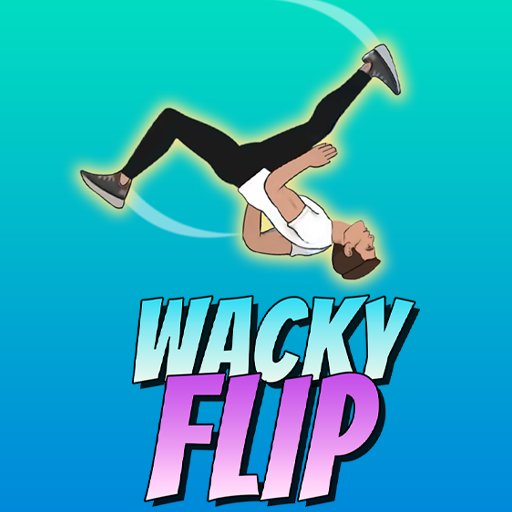
Wacky Flip is a backflip skill game that captures the specific appeal of urban parkour — not speed, not combat, just the pure physicality of launching yourself off an obstacle, rotating cleanly through the air, and sticking a landing that would genuinely impress people watching from the sidewalk. Set against the familiar backdrop of city street environments, with oil barrels, traffic cones, and concrete dividers marking your jump points, the game makes every successful backflip feel earned in a way that more forgiving sports games can't replicate.
The core mechanic is deceptively nuanced for a game with one control input. Hold to crouch and load power, release to launch, hold again to flip — the timing of each phase of this sequence determines whether you land on your feet with a clean upright posture or face-plant into the pavement in spectacular fashion. The brief period between launch and landing where you control the flip rotation is the game's skill window, and developing the timing sense to complete the right number of rotations before your feet need to be back on the ground is the learning curve the game asks you to climb.
The challenges escalate meaningfully across the game's progression. Early jumps from ground-level obstacles develop your baseline flip timing; later challenges — including backflips from the top of basketball hoops — introduce the elevated starts and extended air time that demand both precise rotation control and confident commitment to a landing approach that you're choosing several meters above the ground. Wacky Flip is a game that rewards the player who leans into the risk rather than hesitating at the height, because hesitation in a backflip — real or simulated — is always where things go wrong.
Key Details:
Genre:
Sports / Skill Game
Difficulty Level:
Medium–Hard
Average Play Time:
10–20 minutes per session
Best For:
Players who enjoy precise skill-based sports games with satisfying progression and urban parkour aesthetics
How to Play Wacky Flip?
Getting Started:
Click and hold the left mouse button to get into position, crouch down, and build launch power.
Release the mouse button to launch your character into the air — the timing of the release determines the height and angle of the jump.
Hold the mouse button again while airborne to initiate and control the backflip rotation.
Complete the rotation and ensure your character is upright before landing — a successful landing with clean posture scores the flip.
If you fall or land badly, get up and try again — failed flips are part of the learning process and the game is designed to be re-attempted.
Basic Controls:
Input
Action
Click + Hold LMB
Crouch and build launch power
Release LMB
Launch into the air
Hold LMB (airborne)
Rotate / flip
Objective: Successfully complete backflips over each obstacle — oil barrels, traffic cones, concrete dividers, basketball hoops, and more — by timing your launch, rotation, and landing correctly. Progress through challenges to unlock new flip techniques and locations.
Wacky Flip Game Features & Highlights
Three-phase flip mechanic — crouch, launch, and rotate as three distinct timed inputs that together determine flip success or failure
Urban street environment — familiar city objects (oil barrels, traffic cones, concrete dividers, basketball hoops) as jump platforms
Escalating challenge height — from ground-level obstacles to elevated launches from basketball hoops and other high positions
Skill unlock progression — new backflip techniques unlock as you master earlier challenges
Failure-positive design — face-plants are expected and encouraged; the game rewards persistence and iteration rather than perfection on first attempts
Wacky Flip Tips & Strategies
Beginner Tips:
Focus on consistent launch timing before optimizing rotation — a well-timed launch that produces reliable air time is more important than perfect rotation timing on top of a badly timed launch. Get the crouch-and-release phase consistent first; the rotation becomes easier to control once the air time is predictable.
Over-rotating is safer than under-rotating — a flip that completes too many rotations often produces a stumble on landing but not a complete fail; a flip that under-rotates almost always ends in a face-plant. In early practice sessions, err toward more rotation rather than less until you've calibrated your timing.
Don't rush to the height challenges — the elevated challenges (basketball hoop and higher) require the same fundamental timing but with longer air time that creates a larger rotation window and more consequence if you misjudge it. Build confident flip timing at ground-level obstacles before attempting high launches.
Advanced Strategies:
Learn the rotation rate for each obstacle height — taller obstacles give more air time, which means the rotation speed that produces one clean flip at ground level may produce 1.5 flips at basketball hoop height. Adjust your flip hold duration for each challenge's specific air time rather than using the same timing universally.
Commit to the landing stance early — in the final quarter of the flip's rotation, begin preparing for the landing by releasing the rotation hold so your character has time to stabilize. Players who hold the rotation until the last possible moment often under-correct and land at an angle rather than fully upright.
High-position challenges reward larger crouch power — from elevated positions like the basketball hoop, building maximum launch power gives you more air time and a larger rotation window that makes precision control more forgiving. Don't conserve power on high-start challenges.
What to Watch Out For:
Inconsistent crouch duration — the amount of power built during the crouch phase directly affects air time, which affects how much rotation is possible. Inconsistent crouch holds produce variable air time that makes rotation timing feel random. Standardize your crouch duration for each obstacle type before adjusting rotation.
Landing angle on sloped surfaces — some challenge platforms have slight slopes that change the required landing angle for a successful upright posture. Adjust your rotation target based on the surface angle rather than aiming for the same vertical landing on every obstacle type.
Wacky Flip Game Elements Explained
Three-Phase Flip Mechanic: Wacky Flip's control system divides the backflip into three distinct phases that each require their own timing decision. The crouch phase — holding the left mouse button from rest — builds the spring energy that determines jump height and air time. A longer hold builds more power; a shorter hold produces a lower, less controlled launch. The launch phase — releasing the button — sends the character airborne at the angle and height determined by the crouch duration. The flip phase — holding the button again while airborne — initiates the rotation and controls its speed and duration. Releasing during the flip phase stops the rotation at whatever angle the character has reached, which should ideally be upright and approaching the ground at a controlled angle for a clean landing. Each phase is independent but they all compound: a poorly calibrated crouch affects the launch; a poorly calibrated launch affects the time available for the flip; a poorly calibrated flip determines the landing quality. Mastering all three phases in sequence, rather than optimizing one while neglecting the others, is the skill development arc the game teaches.
Challenge Progression: Wacky Flip's challenges escalate by increasing the height and complexity of the launch platform rather than changing the fundamental backflip mechanic. Ground-level obstacles — oil barrels, traffic cones, concrete dividers — establish the basic flip timing on a forgiving timescale where minor rotation errors can be corrected before landing. Mid-height obstacles require maintaining rotation control for slightly longer, narrowing the landing window. The basketball hoop challenge represents the game's most significant height escalation: the extended air time from a launch position several meters above the ground creates a rotation window long enough to include multiple possible rotation counts, making the decision of when to stop rotating more complex than the ground-level equivalent. The height progression ensures that skills built at lower obstacles transfer meaningfully to higher ones while still requiring adaptation.
Failure & Retry Culture: Wacky Flip's design explicitly embraces failure as a learning mechanism rather than treating it as a punished outcome. The game's own instructions acknowledge that face-plants are "natural" during skill development and encourages persistence rather than discouraging failure. This isn't just supportive messaging — it reflects the game's actual progression model, where repeated attempts at the same obstacle provide the feedback needed to calibrate each phase of the flip sequence. A failed backflip that over-rotates teaches specifically that the flip hold was too long for that obstacle's air time; a failed flip that under-rotates teaches the opposite. The specificity of failure information in Wacky Flip is what makes retry sessions productive rather than frustrating — each attempt provides actionable calibration data that the next attempt can apply.
Wacky Flip Frequently Asked Questions
Q: How do I perform a successful backflip in Wacky Flip? A: The backflip has three phases: hold the left mouse button to crouch and build power, release to launch, then hold again while airborne to flip. Release the button when your character is completing the rotation and approaching an upright landing position. Timing all three phases correctly produces a clean landed flip.
Q: What should I do if I keep face-planting? A: Identify which phase is failing — if you're landing before the flip completes, your air time is too short (shorter crouch, lower launch) or your flip hold started too late. If you're landing past upright, your flip is over-rotating — release the hold button earlier in the rotation. Each specific failure type provides clear calibration information for the next attempt.
Q: Is Wacky Flip compatible with mobile devices? A: Wacky Flip uses mouse click and hold controls — these translate to touch-press and hold on mobile touchscreen devices. Tap and hold to crouch, release to launch, and tap and hold again while airborne to flip.
Q: How do I unlock new skills and challenges? A: Complete each challenge successfully — a clean, upright landing on each obstacle — to progress to the next challenge and unlock new flip techniques. Consistent landing posture rather than just survival is typically required for challenge completion credit.
Q: Is it okay to fail many times before succeeding? A: Yes — Wacky Flip is specifically designed around the expectation of repeated attempts. The game's own guidance acknowledges that learning backflip timing takes time, and each failed attempt provides specific information about what to adjust. Persistent iteration is the correct approach.
Related Games Like Wacky Flip You Might Enjoy
If you like Wacky Flip, you might also enjoy:
Black Holeio - It is another easy-to-start browser game with strong replay value.
Wormateio - It is another easy-to-start browser game with strong replay value.
Roshambo - It is another easy-to-start browser game with strong replay value.

 Drift Frenzy
 Drift Rush
 Arcade Glide
 Track Dash
 Retro Rush
 Escape Road 3
 Wave Rider
 Traffic Road
 Escape Road City 2
 Bike Xtreme
 Escape Road 2
 Traffic Rally
 Tap Drift
 Drive Mad
 Wheelie Master
 Wheelie Party
 Moto X3M
 Street Wheelie
 Car Chaos
 Escape Drive
 Blocky Rider
 Mad Pursuit
 Mad Racers
 Chase Rush
 Smashy Road
 Driftio
 Night City Racing
 Hill Climb Racing
 Drift Hunters
 Smash Karts
 GT Cars Mega Ramps
 Motorcycle Racer Road Mayhem
 Funny Mad Racing