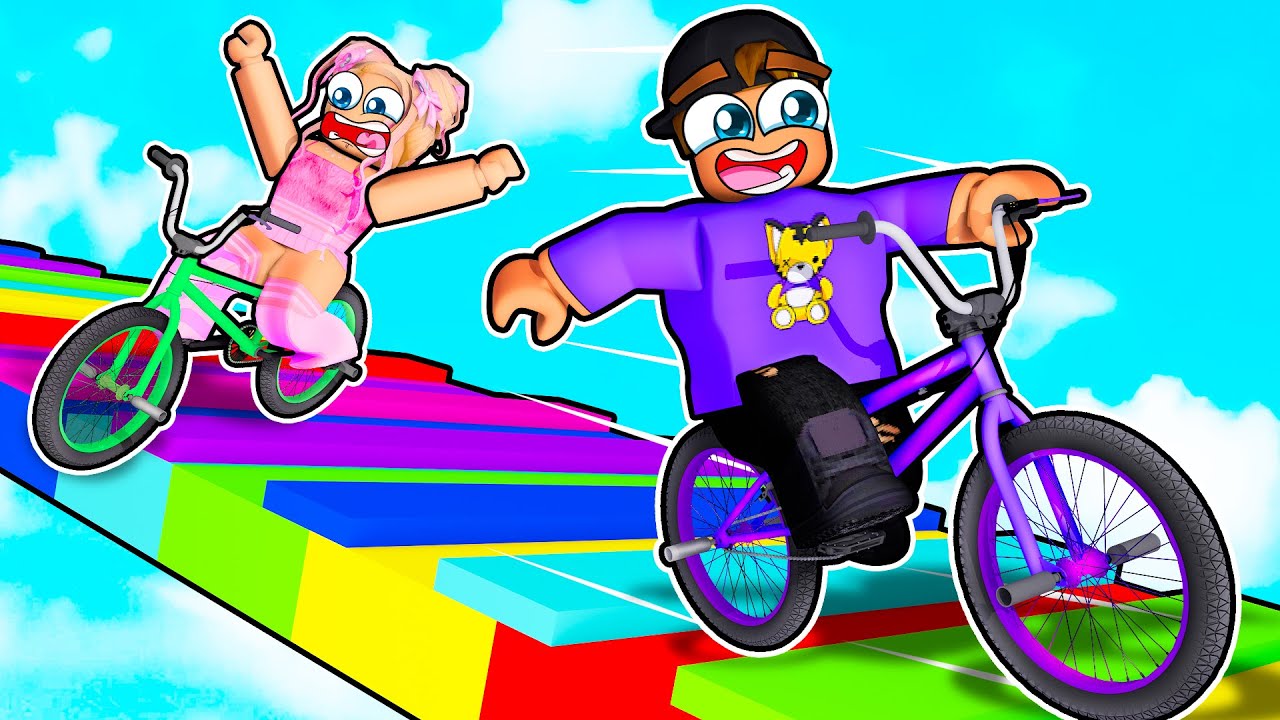
Treat elevation as your primary threat — on aerial tracks, going off the edge is always more dangerous than hitting an obstacle. Ride near the center of floating platforms rather than the edges, especially when approaching jumps.
Learn the Space jump timing before attempting complex sections — the jump mechanic has a specific input-to-air-time relationship that takes a few runs to internalize. Practice on simpler early sections before attempting the tighter aerial platform jumps.
Checkpoints first, coins second — checkpoints save your progress within the course. Reaching a new checkpoint before falling is more valuable than collecting every coin on a section you haven't safely reached yet.
Obby On A Bike
Play Obby On A Bike online free at racing-limits.io. Jump into instant browser gameplay with no downloads.
Obby On A Bike takes the beloved obstacle course format and attaches it to a bicycle — then puts that bicycle in the sky. Floating tiles, aerial staircases, and mid-air platforms replace the ground-level obstacle courses most players know, and the consequence of a mistake isn't a stumble but a fall with nothing below. The combination of bike physics, parkour-style obstacle navigation, and elevation-based tension creates a challenge that is immediately accessible to anyone familiar with obstacle games and genuinely distinctive in how it plays.
The game captures the Roblox obby spirit — the same blocky determination, coin collection, checkpoint progression, and playful character customization — but brings it to a standalone browser format with its own visual identity and mechanics. Coin collecting and checkpoint tagging form the backbone of each run, giving every session a clear set of targets beyond simple survival. The single-player mode focuses on mastering the aerial obstacle course; the two-player mode turns the same challenge into a head-to-head race on split-screen, where the first player to complete coin and checkpoint objectives wins.
Character and bike customization adds a personal expression layer that keeps the game feeling fresh across repeated sessions. Six mountain bike models and a full range of character appearance options — hair, face, hat, glasses, clothes, backpacks — let players build a look that's genuinely their own. Most skins unlock through coin collection or short video watches rather than extended grind, keeping the cosmetic progression accessible. Obby On A Bike is a game for every age, designed to be immediately enjoyable for first-time players and satisfying enough for experienced obstacle course enthusiasts to return to across many sessions.
Key Details:
Genre:
Obstacle Course / Bike Platformer
Difficulty Level:
Easy–Medium
Average Play Time:
10–20 minutes per session
Best For:
All ages; fans of Roblox-style obstacle games and players who enjoy bike platformers with character customization
How to Play Obby On A Bike?
Getting Started:
Select Single Player mode to race the aerial obstacle course solo, or Two Player mode for a split-screen race against a friend.
Use WASD or Arrow Keys to ride your bike through the obstacle course — steering, accelerating, and braking as you navigate each section.
Press Space to jump when a gap, staircase, or elevated tile requires you to leave the ground.
Collect coins along the course and hit checkpoints — these are your twin objectives in each run.
Customize your bike and character appearance between runs using collected coins or by watching short videos to unlock new skins.
Basic Controls:
Key
Action
W / Up Arrow
Accelerate
S / Down Arrow
Brake / Reverse
A / Left Arrow
Steer Left
D / Right Arrow
Steer Right
Space
Jump
Objective: Complete the aerial obstacle course by collecting coins and reaching all checkpoints before falling or running out of track. In two-player mode, be the first to complete all coin and checkpoint objectives on your half of the split screen.
Obby On A Bike Game Features & Highlights
Aerial obstacle course design — floating tiles and sky-level tracks create an elevation-based challenge absent from most bike games
Two-player split-screen mode — competitive side-by-side racing on the same computer with independent track sections per player
Six mountain bike models — distinct vehicle options with different visual profiles and handling characteristics
Full character customization — change hair, face, hat, glasses, clothes, and backpack to create a unique appearance
Accessible skin unlock system — most skins available through coin collection or short video watches rather than extended progression locks
Obby On A Bike Tips & Strategies
Beginner Tips:
Treat elevation as your primary threat — on aerial tracks, going off the edge is always more dangerous than hitting an obstacle. Ride near the center of floating platforms rather than the edges, especially when approaching jumps.
Learn the Space jump timing before attempting complex sections — the jump mechanic has a specific input-to-air-time relationship that takes a few runs to internalize. Practice on simpler early sections before attempting the tighter aerial platform jumps.
Checkpoints first, coins second — checkpoints save your progress within the course. Reaching a new checkpoint before falling is more valuable than collecting every coin on a section you haven't safely reached yet.
Advanced Strategies:
In two-player mode, track your opponent's position — the split-screen format lets you glance at your opponent's section. Knowing whether they're ahead or behind on coin and checkpoint completion changes whether you should prioritize speed or thoroughness in your current section.
Use the brake strategically before jumps — arriving at a jump platform too fast can send you past the target landing tile. A brief brake input before jump sections reduces your horizontal speed and improves landing precision.
Coin routing: plan the most efficient path through each section's coin layout rather than collecting coins in the order they appear — some clusters are reachable with a single detour that's faster than zigzagging through them sequentially.
What to Watch Out For:
Speed on floating platforms — the instinct to maintain speed at all times is correct on ground-level courses but dangerous on aerial platforms. Excessive speed near platform edges dramatically reduces your correction time if you drift wide.
Over-jumping gaps — misjudging a jump distance on an aerial course lands you in empty air rather than solid ground. Start with conservative jump timing and extend based on actual gap distances rather than what looks like it needs a big jump.
Obby On A Bike Game Elements Explained
Aerial Course Design: The aerial obstacle course format is Obby On A Bike's defining design choice. Unlike ground-level obstacle games where a mistake means stopping or restarting a section, aerial courses make every mistake potentially a full fall — which resets your progress to the last checkpoint. The floating tiles, sky staircases, and mid-air platforms that make up each course require a fundamentally different riding philosophy than surface-level tracks: speed management becomes more conservative, edge awareness becomes constant, and jump precision becomes the primary skill rather than obstacle avoidance. The elevation doesn't just increase the stakes — it changes which skills the game actually tests. A player who excels at ground-level bike games may find the aerial format initially challenging precisely because the competencies are different, not just harder.
Two-Player Mode: The two-player mode in Obby On A Bike splits the screen between both players, giving each their own aerial obstacle course track running in parallel. Player 1 uses WASD and Player 2 uses Arrow Keys — the same input layout but physically separated to avoid keyboard conflicts. The first player to complete the required coin collection and checkpoint objectives wins the round. The split-screen format creates a natural competitive dynamic: you can monitor your opponent's progress in the adjacent screen panel, which introduces race psychology into what would otherwise be a pure individual challenge. Knowing your opponent has just hit a checkpoint you haven't reached yet creates pressure to push harder; knowing they've fallen gives you permission to be more careful. The parallel track structure ensures both players face equivalent challenge, making the result a fair measure of relative skill.
Customization System: Obby On A Bike's customization system spans two layers — the bike and the character. Six mountain bike models provide distinct visual options, with different designs that range from standard trail bikes to more stylized alternatives. Character customization operates across multiple appearance slots simultaneously: hair, face, hat, glasses, clothing, and backpack can all be independently configured, allowing for a combination space large enough that truly identical characters are rare in practice. Most skins and customization options are unlocked through coin collection during runs or by watching short video advertisements — a deliberately accessible unlock model that doesn't gate appearance options behind extended progression. The result is that players can establish a distinctive visual identity relatively early in their time with the game, which reinforces the sense of ownership and personal expression that makes return visits feel more meaningful.
Obby On A Bike Frequently Asked Questions
Q: How do I jump in Obby On A Bike? A: Press Space to jump. The jump can be timed for gaps between floating platforms or to clear obstacles elevated above the track surface. Practice jump timing on the earlier, simpler sections of the course before attempting the tighter platform-to-platform jumps that appear in later sections.
Q: What should I do if I keep falling off aerial platforms? A: Reduce your speed before and on aerial sections — excessive speed gives you less time to correct if you drift toward an edge. Ride toward the center of platforms rather than the edges, and use the brake before jump points to control your horizontal speed into the air.
Q: How does the two-player mode work? A: Both players share the same computer. Player 1 uses WASD and Player 2 uses Arrow Keys. The screen splits between both players, each with their own parallel track section. The first player to collect all required coins and hit all checkpoints on their track wins.
Q: How do I unlock new bike skins and character customization options? A: Most skins are unlockable through coin collection during runs or by watching short video advertisements within the game. Check the customization menu between runs to see which options are available at your current coin total and which require a video watch to unlock.
Q: Is Obby On A Bike compatible with mobile devices? A: Obby On A Bike supports both keyboard and touch controls, making it playable on mobile devices. The core WASD/Arrow key inputs translate to on-screen touch controls on mobile browsers, though desktop play with a keyboard offers the most precise control for aerial sections.
Related Games Like Obby On A Bike You Might Enjoy
If you like Obby on a Bike, you might also enjoy:
Bike Xtreme - It delivers a similar driving challenge with quick browser-based racing sessions.
Driftio - It delivers a similar driving challenge with quick browser-based racing sessions.
Night City Racing - It delivers a similar driving challenge with quick browser-based racing sessions.

 Drift Frenzy
 Drift Rush
 Arcade Glide
 Track Dash
 Retro Rush
 Escape Road 3
 Wave Rider
 Traffic Road
 Escape Road City 2
 Bike Xtreme
 Escape Road 2
 Traffic Rally
 Tap Drift
 Drive Mad
 Wheelie Master
 Wheelie Party
 Moto X3M
 Street Wheelie
 Car Chaos
 Escape Drive
 Blocky Rider
 Mad Pursuit
 Mad Racers
 Chase Rush
 Smashy Road
 Driftio
 Night City Racing
 Hill Climb Racing
 Drift Hunters
 Smash Karts
 GT Cars Mega Ramps
 Motorcycle Racer Road Mayhem
 Funny Mad Racing