Start with racing missions to get comfortable with a vehicle's handling before attempting evasive police-chase scenarios.
Use the vehicle condition restore key (K) between attempts rather than restarting an entire mission after a crash.
Explore Sandbox mode early to learn how different vehicles respond to ramps and terrain without mission pressure.
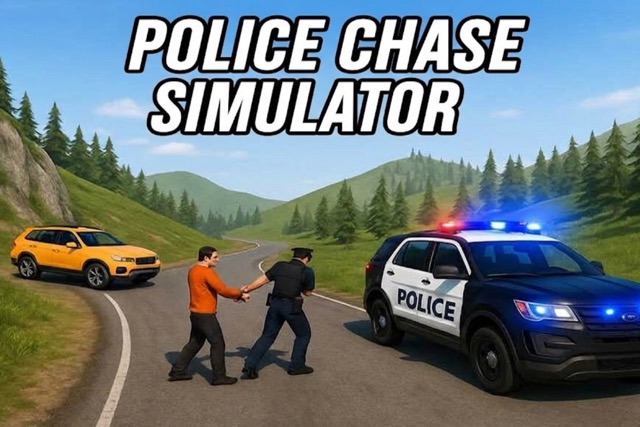
Police Chase Simulator
Play Police Chase Simulator online free at racing-limits.io. Police Chase Simulator is less about following a strict rulebook and more about giving you a large, dynamic sandbox to explore, experiment in, and cause the occasional chaotic pursuit.
Choose a mission mode (racing or police chase) or enter Sandbox mode for free experimentation.
Select a vehicle and environment — city, countryside, moon, or another available map.
Complete racing objectives using speed management, drifting, and nitro, or evade pursuit in chase scenarios.
Use destructible environment interactions to your advantage during high-speed encounters.
In Sandbox mode, test vehicles on ramps and props, using the time-slow effect for precise stunts.
Basic Controls:
Action
Key/Input
Drive / Steer
WASD
Handbrake
Spacebar
Nitro Boost
Shift
Change Camera View
C
Reset Vehicle Position
R
Restore Vehicle Condition
K
Slow Down Time
B
Objective: Complete varied racing and police-chase missions across diverse environments, using speed, evasive driving, and awareness of destructible surroundings. In Sandbox mode, there's no fixed objective — the goal is open experimentation with vehicles, stunts, and the environment itself.
Police Chase Simulator Game Overview
Police Chase Simulator is less about following a strict rulebook and more about giving you a large, dynamic sandbox to explore, experiment in, and cause the occasional chaotic pursuit. Environments range from dense urban streets to open countryside and genuinely surreal low-gravity zones, and each one encourages a different flavor of play — creative driving, vehicle testing, and pursuits that develop naturally out of whatever you happen to be doing at the time.
Mission-based content mixes structured objectives with real freedom. Racing modes test speed management, drifting, and nitro usage across varied terrain, while police chase scenarios shift the emphasis toward evasive driving, smart route selection, and staying aware of traffic and obstacles that can end a chase in an instant. Environments are destructible and react to crashes in real time, changing available paths mid-pursuit and forcing quick reassessment. Different vehicles handle uniquely from one another, so adapting your driving style to whatever car you're in becomes a real, ongoing skill rather than a one-time learning curve.
Beyond the structured missions, Sandbox mode strips away restrictions entirely, letting you test vehicles on ramps, hydraulic presses, and various props while using a time-slow effect to line up precise stunts and controlled impacts. Multiplayer mode expands the experience further with shared chases, competitive races, and genuinely cooperative sandbox chaos alongside other players. For anyone who enjoys destructible-physics driving games with room to experiment as much as compete, Police Chase Simulator offers a broad, flexible playground.
Key Details:
Genre: Driving Sandbox / Pursuit Simulation
Difficulty Level: Variable (mission-dependent; Sandbox mode has no fail state)
Average Play Time: 5–15 minutes per session
Best For: Players who enjoy open-ended, physics-driven driving experimentation alongside structured pursuit missions
Police Chase Simulator Game Features & Highlights
Diverse maps including city streets, countryside, and surreal low-gravity zones
Fully destructible vehicles and environments with detailed physics
Advanced car tuning and visual customization options
Time-slow feature for precise, cinematic stunt execution
Sandbox freedom without mission restrictions
Online multiplayer with shared chases and cooperative chaos
Police Chase Simulator Tips & Strategies
Beginner Tips:
Start with racing missions to get comfortable with a vehicle's handling before attempting evasive police-chase scenarios.
Use the vehicle condition restore key (K) between attempts rather than restarting an entire mission after a crash.
Explore Sandbox mode early to learn how different vehicles respond to ramps and terrain without mission pressure.
Advanced Strategies:
Use the time-slow effect (B) during complex stunts or precise navigation moments rather than throughout an entire run, since it works best as a targeted tool.
Learn how destructible environments change available routes during a chase, and use that knowledge to create new escape paths rather than relying on fixed roads.
Experiment with vehicle tuning in Sandbox mode before committing changes to a vehicle you plan to use in competitive Multiplayer.
What to Watch Out For:
Relying on a single vehicle's handling profile across very different environments — countryside, city, and low-gravity zones all demand different approaches.
Overusing nitro early in police chases, leaving nothing in reserve for a critical late-chase escape moment.
Police Chase Simulator Game Elements Explained
Destructible Environment System: Police Chase Simulator's environments aren't just backdrops — they react dynamically to crashes and collisions, meaning the available paths through a level can genuinely change mid-session. A wall that blocked a shortcut at the start of a chase might be gone by the end of it, opening new routes that weren't available before. This system rewards players who stay aware of how their own driving (and rivals' or pursuers' driving) is reshaping the environment in real time, rather than assuming a route that worked once will always be available. It also adds a layer of unpredictability to repeated attempts at the same mission, since no two runs necessarily play out on identical terrain.
Time-Slow Stunt Tool: The B key activates a time-slow effect that's especially useful in Sandbox mode, where precise stunts on ramps, presses, and props require more control than real-time reflexes generally allow. Rather than a combat or racing advantage, this feature is best understood as a creative tool — it gives you room to line up a jump, adjust your vehicle's angle mid-air, or fine-tune a controlled impact for a specific visual or functional result. Players focused on structured missions may use it less often, but it becomes essential for anyone using Sandbox mode to test elaborate stunts or vehicle behavior in detail.
Police Chase Simulator Frequently Asked Questions
Q: How do I switch between racing and police chase missions? A: Select your preferred mission type from the main mode menu before starting a session; each mode offers a different set of objectives and environments.
Q: What should I do if my vehicle gets damaged during a chase? A: Press K to restore your vehicle's condition, or R to reset its position if it becomes stuck or flipped during a pursuit.
Q: Is this game compatible with mobile devices? A: Yes, Police Chase Simulator runs on desktop, tablet, and mobile browsers, though desktop WASD controls and the full function-key set generally offer more precise handling, especially in Sandbox mode.
Q: Can I save my progress? A: Vehicle customization, tuning, and mission progress are generally saved in your browser between sessions.
Q: How do I access Multiplayer mode? A: Select the Multiplayer option from the main menu to join shared chases, competitive races, or cooperative sandbox sessions with other online players.
Related Games Like Police Chase Simulator You Might Enjoy
If you like Police Chase Simulator, you might also enjoy:
Fury Chase - It delivers another high-pressure vehicle challenge built around fast reactions and survival.
GTA Car Rush - It delivers another high-pressure vehicle challenge built around fast reactions and survival.
GTA: Save My City - It delivers another high-pressure vehicle challenge built around fast reactions and survival.

 Drift Frenzy
 Drift Rush
 Arcade Glide
 Track Dash
 Retro Rush
 Escape Road 3
 Wave Rider
 Traffic Road
 Escape Road City 2
 Bike Xtreme
 Escape Road 2
 Traffic Rally
 Tap Drift
 Drive Mad
 Wheelie Master
 Wheelie Party
 Moto X3M
 Street Wheelie
 Car Chaos
 Escape Drive
 Blocky Rider
 Mad Pursuit
 Mad Racers
 Chase Rush
 Smashy Road
 Driftio
 Night City Racing
 Hill Climb Racing
 Drift Hunters
 Smash Karts
 GT Cars Mega Ramps
 Motorcycle Racer Road Mayhem
 Funny Mad Racing