Gravity rotation is a navigation tool, not just an accident — new players often treat wall-running as something that happens unintentionally when they move too far to the side. Instead, approach it as an intentional movement option: when a gap appears ahead, assess whether rotating to the adjacent wall provides a route that bypasses it.
Move continuously on collapsing tile sections — fragile tiles begin falling when you step on them. Standing still or slowing on a collapsing tile section will produce a fall through the floor. Keep moving at full pace across these sections and don't pause to survey the path ahead.
In Exploration mode, note which path choice at tunnel branches was correct — Run 3's tunnel system has branching paths. If a chosen branch leads to an immediate impossible gap, the other branch would have been the correct choice. Noting this for the retry saves the time of discovering it again.
Run 3
Play Run 3 online free at racing-limits.io. Jump into instant browser gameplay with no downloads.
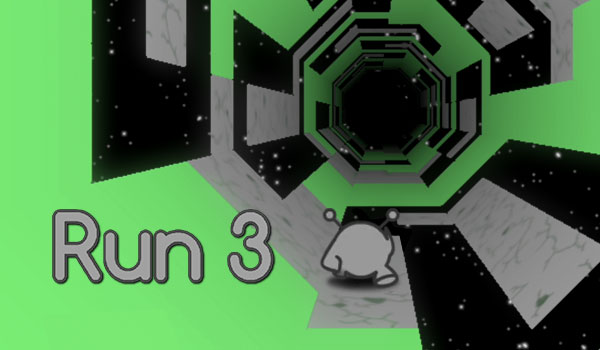
Run 3 is a zero-gravity space runner where the tunnel you're sprinting through is as much a hazard as the obstacles inside it. Your small alien character runs automatically, and the world doesn't just scroll past — it rotates around you. When you run along a wall, gravity shifts so that the wall becomes the floor. When the floor tiles collapse beneath you, the gap is a direct path into the void of space. The game combines the speed and reaction demands of a classic endless runner with the spatial orientation puzzle of a tunnel that can be traversed from any angle.
The game's defining mechanic is wall-running. Unlike flat-surface runners where left, right, and jump are your full movement vocabulary, Run 3 adds a fourth dimension: when you move to the edge of the current surface, gravity rotates, making the adjacent wall your new floor. This rotation mechanic is how you avoid gaps — instead of jumping over them, you can sometimes side-step onto the wall and run along it until a solid floor section reappears. Managing this gravity rotation actively, rather than treating the tunnel as a flat surface with occasional jumps, is what separates Run 3 players who develop real tunnel navigation skill from those who treat it as a standard endless runner.
Two modes serve different player motivations. Exploration mode structures the experience as a level-by-level tunnel system with branching paths and character unlocks — a more conventional progression format for players who want goals and milestones. Infinite mode removes all structure for pure distance-chasing competition. The character unlock system adds long-term engagement beyond single sessions: different characters have different movement capabilities that make certain tunnel configurations more or less manageable. Run 3 is a runner with genuine depth — the gravity rotation mechanic creates a spatial reasoning challenge that takes real time to develop and consistently rewards the effort invested in mastering it.
Key Details:
Genre:
Endless Runner / Spatial Puzzle
Difficulty Level:
Easy start, Hard in later levels
Average Play Time:
10–20 minutes per session
Best For:
Players who enjoy endless runners with movement system depth, gravity-based spatial mechanics, and both structured level and infinite distance modes
How to Play Run 3?
Getting Started:
Your character runs automatically — use Left/Right Arrow keys to move laterally across the tunnel floor.
Press Up Arrow or Spacebar to jump over gaps or obstacles in your path.
Move to the tunnel's edge and continue — your character shifts onto the wall, which becomes your new floor as gravity rotates.
Avoid falling through gaps into space — use wall-running to bypass floor gaps and jumping to clear obstacles.
In Exploration mode, complete each tunnel level to unlock new levels and characters. In Infinite mode, run as far as possible to set distance records.
Basic Controls:
Key
Action
Left Arrow
Move Left
Right Arrow
Move Right
Up Arrow / Space
Jump
R (some versions)
Reset quickly
Objective: Navigate the space tunnel without falling through gaps into the void. Use jumping and gravity-rotation wall-running to maintain surface contact. In Exploration mode, complete tunnel levels to progress. In Infinite mode, maximize survival distance for a personal record.
Run 3 Game Features & Highlights
Gravity rotation mechanic — running to the tunnel edge shifts gravity and the adjacent wall becomes the new floor, enabling gap bypasses without jumping
Two game modes — Exploration (structured level progression with character unlocks) and Infinite (endless distance record-setting)
Collapsing tile floors — fragile platforms that fall when stepped on require immediate continued movement to avoid dropping through
Multiple unlockable characters — each with distinct movement capabilities suited to different tunnel configurations
Zero-gravity space setting — tunnels that rotate around the player create a genuinely three-dimensional movement experience
Run 3 Tips & Strategies
Beginner Tips:
Gravity rotation is a navigation tool, not just an accident — new players often treat wall-running as something that happens unintentionally when they move too far to the side. Instead, approach it as an intentional movement option: when a gap appears ahead, assess whether rotating to the adjacent wall provides a route that bypasses it.
Move continuously on collapsing tile sections — fragile tiles begin falling when you step on them. Standing still or slowing on a collapsing tile section will produce a fall through the floor. Keep moving at full pace across these sections and don't pause to survey the path ahead.
In Exploration mode, note which path choice at tunnel branches was correct — Run 3's tunnel system has branching paths. If a chosen branch leads to an immediate impossible gap, the other branch would have been the correct choice. Noting this for the retry saves the time of discovering it again.
Advanced Strategies:
Use wall-running to create angle approaches to difficult gaps — some gap configurations in Run 3 are easier to navigate from a wall-running angle than from the floor. Running along the wall until you're positioned at a favorable angle to the gap, then jumping across from that position, bypasses gap configurations that seem impassable from the floor perspective.
Learn each character's jump arc — different unlockable characters have different jump heights and distances. A character with a lower arc needs earlier jump initiation than one with a higher arc. Calibrating your jump timing to the specific character you're using — rather than carrying over timing from a different character — produces significantly cleaner gap clearances.
In Infinite mode, prioritize staying near tunnel center — center positioning in infinite mode gives you equal rotation options in both directions when a gap appears, whereas edge positions commit you to rotating one specific direction. Center maintenance provides maximum reactive flexibility as tunnel configurations become more demanding.
What to Watch Out For:
Disorientation after rapid gravity rotations — multiple consecutive wall-to-wall rotations can produce brief spatial disorientation about which direction is "forward" relative to your original orientation. If you feel disoriented after several rotations, briefly reduce lateral input and let your orientation re-establish before making the next navigation decision.
Mistiming jumps after gravity rotates — the jump arc after a gravity rotation is relative to your new surface, not your previous one. Players who jump immediately after rotating sometimes misjudge the jump direction because their spatial reference is still calibrated to the pre-rotation orientation. Allow a step or two on the new surface before jumping to re-establish your directional reference.
Run 3 Game Elements Explained
Gravity Rotation System: The gravity rotation mechanic is Run 3's most distinctive feature and the element that makes it fundamentally different from flat-surface endless runners. The tunnel you're running through is a three-dimensional tube — it has a floor, walls, and a ceiling, all of which can function as your running surface depending on your character's current gravity orientation. Moving your character to the edge of the current surface and stepping onto the adjacent wall triggers a gravity rotation: the new surface becomes "down," the previous surface becomes "up," and the entire tunnel reorients relative to your character's new orientation. This rotation mechanic creates two navigation tools beyond jumping: lateral wall-running to bypass floor gaps, and intentional surface-switching to access tunnel sections that aren't reachable from the current surface orientation. Mastering which tool to apply in which tunnel configuration — jump, rotate, or jump after rotating — is the spatial reasoning skill that Run 3 develops over time.
Tunnel Structure & Collapsing Tiles: Run 3's tunnel levels are constructed from two surface types: fixed solid tiles that remain stable regardless of how they're stepped on, and fragile tiles that collapse after a brief contact moment. The visual distinction between solid and fragile tiles is one of the most important recognition skills in the game — fragile tiles are visually distinct (lighter, cracked, or differently colored depending on the version) and require immediate continued movement to avoid falling through when stepped on. Tunnel sections with fragile tiles demand a different movement approach than solid sections: rushing rather than pausing, maintaining forward momentum rather than adjusting position mid-section. The combination of fragile tiles, gaps, and gravity rotation options in a single tunnel section creates the game's most demanding navigation challenges.
Mode System: Run 3's two modes address different player motivations without compromising either experience. Exploration mode organizes the tunnel network into numbered levels with defined entry and exit points, creating a structured progression that provides specific completion goals and milestone character unlocks as progression rewards. This mode is ideal for players who want to feel forward momentum and have external objectives guiding each session. Infinite mode removes all structure in favor of pure distance maximization — no levels, no objectives, no narrative context, just the tunnel and the question of how far the player can go. This mode is ideal for players who want the focused intensity of personal best competition and prefer the game's reflexive core without level-specific obstacles or branching decision points. The two modes use the same underlying mechanics but produce genuinely different play experiences.
Run 3 Frequently Asked Questions
Q: How does the gravity rotation work in Run 3? A: Move your character to the edge of the current running surface and step onto the adjacent wall — your character's gravity rotates so the wall becomes the new floor. The tunnel reorients around your character's new surface. This allows you to run along what was previously a wall, bypassing gaps in the original floor without jumping.
Q: What should I do when collapsing tiles appear? A: Keep moving at full pace — don't slow down or stop on collapsing tile sections. The tiles begin falling the moment you step on them, so continued movement is the only way to cross them before they drop. Pausing to survey the path on a collapsing section produces a fall.
Q: Is Run 3 compatible with mobile devices? A: Run 3 uses arrow key and spacebar controls and is best suited for desktop and laptop browsers. Some versions support touch controls for mobile play — check the in-game control options. Mobile play with keyboard controls requires a connected external keyboard.
Q: What's the difference between Exploration mode and Infinite mode? A: Exploration mode structures the tunnel system into numbered levels with branching paths and character unlocks as progression rewards — best for players who want specific goals and milestones. Infinite mode is an endless distance challenge with no level structure — best for players pursuing personal best scores and pure run-length competition.
Q: How do I unlock new characters in Run 3? A: Characters unlock through Exploration mode level progression — completing specified levels unlocks new characters with different movement capabilities. Check the character selection screen to see which levels must be completed to access each character's unlock condition.
Related Games Like Run 3 You Might Enjoy
If you like Run 3, you might also enjoy:
Run Sausage Run - It has the same fast-restart arcade rhythm and rewards sharper timing.
Run And Jump - It has the same fast-restart arcade rhythm and rewards sharper timing.
Slope 3 - It has the same fast-restart arcade rhythm and rewards sharper timing.

 Drift Frenzy
 Drift Rush
 Arcade Glide
 Track Dash
 Retro Rush
 Escape Road 3
 Wave Rider
 Traffic Road
 Escape Road City 2
 Bike Xtreme
 Escape Road 2
 Traffic Rally
 Tap Drift
 Drive Mad
 Wheelie Master
 Wheelie Party
 Moto X3M
 Street Wheelie
 Car Chaos
 Escape Drive
 Blocky Rider
 Mad Pursuit
 Mad Racers
 Chase Rush
 Smashy Road
 Driftio
 Night City Racing
 Hill Climb Racing
 Drift Hunters
 Smash Karts
 GT Cars Mega Ramps
 Motorcycle Racer Road Mayhem
 Funny Mad Racing