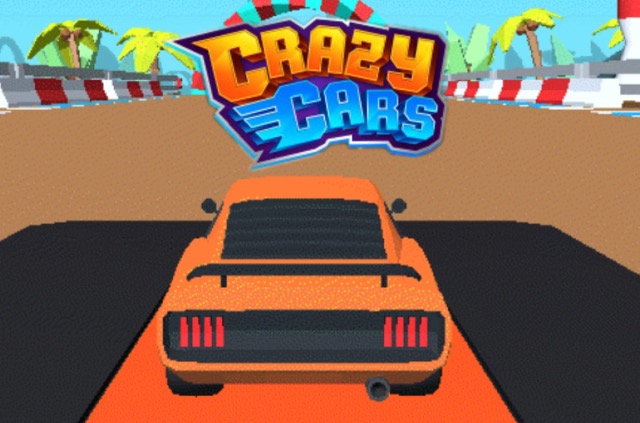
Load Crazy Cars and review the on-screen objective and control prompts.
Choose a vehicle, map, mode, or setup that fits the kind of drive you want.
Use an open area to test acceleration, braking, steering, and camera behavior.
High Score Tips
Start with moderate speed and use the opening section to learn how quickly the vehicle responds.
Look ahead at the route, traffic, obstacles, or opponents instead of watching only the vehicle.
Aim for one clean completion before taking optional risks for extra speed, points, or rewards.
Crazy Cars
Play Crazy Cars online free at racing-limits.io. Crazy Cars is a browser-based 3d driving simulation / stunt sandbox game built around direct vehicle control and repeatable driving challenges.
Load Crazy Cars and review the on-screen objective and control prompts.
Choose a vehicle, map, mode, or setup that fits the kind of drive you want.
Use an open area to test acceleration, braking, steering, and camera behavior.
Complete the immediate goal, then use the result to adjust your route or timing.
Repeat harder events or longer runs as your control becomes more consistent.
Basic Controls:
Arrow Keys or WASD: Drive and steer
Spacebar / Shift / on-screen action button: Use the contextual action when available
Objective: Explore the available environments, learn the vehicles, and create successful drives, drifts, jumps, or self-directed challenges in Crazy Cars.
Crazy Cars Game Overview
Crazy Cars is a browser-based 3d driving simulation / stunt sandbox game built around direct vehicle control and repeatable driving challenges. Instead of forcing one route, the game gives players room to explore, test vehicles, discover ramps, and create their own driving challenges.
Crazy Cars and the journey on the most exciting racing tracks in the gaming world are ready. Players can freely explore winding roads, test different driving styles, and complete a variety of missions without worrying about losing. With multiple maps, stunning environments, and countless challenges, this driving game offers endless fun and satisfaction for both casual and skilled racers alike. Hit the accelerator now and show off your ultimate racing talent! Crazy Cars offers not only one, but many different experiences and missions. The game allows players to maneuver a race car that is impervious to damage. To control the vehicle, you simply use the arrow keys or WASD keys. You can simply drive around the map and explore the endlessly winding roads. Or, find and do specific tasks to improve your performance.
The main attraction is the feedback loop between observation and execution. A new player can understand the immediate task quickly, but reliable results require attention to road shape, vehicle response, hazards, and the timing of each input. Because mistakes are easy to identify, each attempt provides useful information for the next one. That makes Crazy Cars suitable for a short break while still offering enough mechanical depth for players who want to improve routes, scores, or completion consistency.
Key Details:
Genre: 3D Driving Simulation / Stunt Sandbox
Difficulty Level: Variable
Average Play Time: 10–25 minutes per session
Best For: Players who like free exploration, vehicle experimentation, and creative stunts
Crazy Cars Game Features & Highlights
Crazy Cars and the journey on the most exciting racing tracks in the gaming world are ready
The game allows players to maneuver a race car that is impervious to damage
Open environments designed for experimentation and free driving
Multiple vehicles with noticeable handling differences
Ramps, roads, and stunt spaces that reward creative routes
Crazy Cars Tips & Strategies
Beginner Tips:
Start with moderate speed and use the opening section to learn how quickly the vehicle responds.
Look ahead at the route, traffic, obstacles, or opponents instead of watching only the vehicle.
Aim for one clean completion before taking optional risks for extra speed, points, or rewards.
Advanced Strategies:
Learn how the selected vehicle responds before attempting faster drifts, jumps, or technical routes.
Divide difficult routes into decision points and prepare each input before reaching them.
Compare failed attempts to successful ones and change only one element of timing or line at a time.
What to Watch Out For:
Avoid using maximum speed before understanding the terrain, landing angle, or handling of the current vehicle.
Do not stack several panic inputs after a small error; stabilize first, then return to the intended line.
Crazy Cars Game Elements Explained
Open Driving Sandbox: Open Driving Sandbox is the foundation of Crazy Cars. Every useful action begins with reading the route or arena before committing to an input. The vehicle carries momentum, so steering, acceleration, braking, drifting, jumping, or attacking should be treated as connected decisions rather than isolated button presses. Instead of forcing one route, the game gives players room to explore, test vehicles, discover ramps, and create their own driving challenges. To control the vehicle, you simply use the arrow keys or WASD keys. The most effective way to learn this system is to separate speed from precision during early attempts. First identify where control is commonly lost, then reduce the size or duration of the input at that point. Once the line becomes repeatable, add speed without changing the successful timing. This method turns difficult sections into recognizable sequences and makes improvement measurable. It also helps players recover more calmly, because they understand which correction the vehicle needs instead of pressing several directions at once. Mastery comes from making fewer, better inputs while keeping attention on what is ahead.
Vehicle Handling and Customization: Vehicle Handling and Customization gives each session in Crazy Cars a longer-term purpose. Depending on the selected mode, progress may appear through completed levels, distance, score, currency, stars, vehicles, upgrades, or access to harder events. You can simply drive around the map and explore the endlessly winding roads. These rewards matter most when they support a clear weakness. A player struggling to keep control should value handling, stability, or practice-friendly options before chasing maximum speed. Someone who already drives consistently can use faster vehicles or tougher events to raise the challenge. Progress is therefore both numerical and personal: unlocks expand the available choices, while repeated play improves judgment and route knowledge. Browser storage behavior can vary, so players should treat a completed run as valuable practice even when a specific version does not preserve every unlock between devices. The best progression strategy is steady completion, careful spending where applicable, and deliberate practice on the sections that cost the most time or attempts.
Stunts, Exploration, and Replayability: Stunts, Exploration, and Replayability explains why two attempts in Crazy Cars can feel very different even when they begin in the same place. Speed changes the time available to react, while track shape, opponents, obstacles, pickups, or environmental conditions change the safest line. You are free to try everything to accumulate bonus points and upgrade your car. Good decision-making starts with a simple priority: preserve control first, then pursue extra speed, points, attacks, or collectibles when the route allows it. This does not mean playing slowly. It means using maximum commitment only where the next few seconds are visible and manageable. Advanced players build consistency by identifying decision points, such as the entrance to a corner, the approach to a jump, a traffic gap, or the moment before an opponent attacks. They decide early, execute once, and prepare for the next point. That approach reduces panic corrections and makes high-risk options more deliberate. Over time, route awareness becomes as important as reflexes and is usually the difference between an average result and a strong one.
Crazy Cars Frequently Asked Questions
Q: How do I start playing Crazy Cars? A: Load the game, review the on-screen controls, choose any available mode or vehicle, and begin with the first event or open driving area. Use the initial attempt to learn steering and speed before pursuing a high score or difficult objective.
Q: What should I do if I keep losing control? A: Reduce speed before the problem section, use shorter steering inputs, and look farther ahead. Repeat the same section with one small adjustment at a time so you can identify whether speed, angle, or timing caused the mistake.
Q: Is Crazy Cars compatible with desktop, tablet, and mobile browsers? A: The source version is listed as an HTML5 browser game for desktop, tablet, and mobile. Keyboard controls are generally most precise on desktop, while touch support and layout can vary by device and browser.
Q: Can I save my progress? A: Save behavior depends on the hosted version and browser storage. If the game stores unlocks or settings locally, clearing site data, using private browsing, or changing devices may reset them.
Q: How do I unlock additional vehicles, levels, or features? A: Complete the available objectives and collect any score, currency, stars, or rewards shown by the game. Prioritize consistent finishes first, then revisit earlier content for stronger results when an unlock requires a higher score or more resources.
Related Games Like Crazy Cars You Might Enjoy
If you like Crazy Cars, you might also enjoy:
Crazy Taxi - It rewards fast overtakes, traffic awareness, and careful use of open lanes.
Shift to Drift - It rewards fast overtakes, traffic awareness, and careful use of open lanes.
Rocket Racing - It rewards fast overtakes, traffic awareness, and careful use of open lanes.

 Drift Frenzy
 Drift Rush
 Arcade Glide
 Track Dash
 Retro Rush
 Escape Road 3
 Wave Rider
 Traffic Road
 Escape Road City 2
 Bike Xtreme
 Escape Road 2
 Traffic Rally
 Tap Drift
 Drive Mad
 Wheelie Master
 Wheelie Party
 Moto X3M
 Street Wheelie
 Car Chaos
 Escape Drive
 Blocky Rider
 Mad Pursuit
 Mad Racers
 Chase Rush
 Smashy Road
 Driftio
 Night City Racing
 Hill Climb Racing
 Drift Hunters
 Smash Karts
 GT Cars Mega Ramps
 Motorcycle Racer Road Mayhem
 Funny Mad Racing