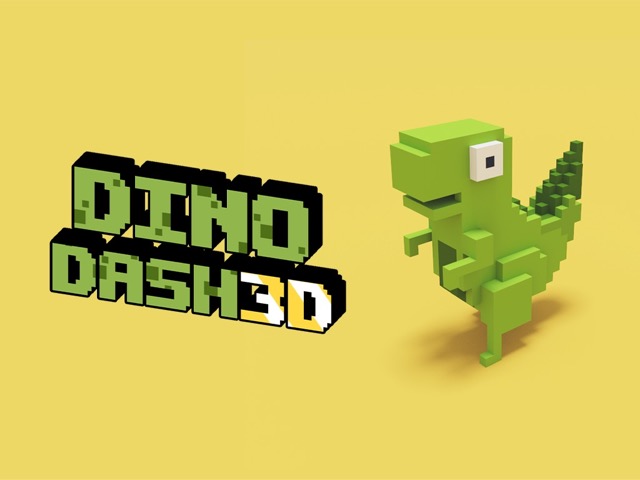
Jump early, not late — the most common mistake for new players is waiting until a cactus is close before jumping. Give yourself a comfortable buffer; landing just past the obstacle is always better than clipping its top.
Before reacting to a bird, classify it first : low-flying birds need a duck; high-flying birds need a jump or simply nothing — keep running. Reacting the wrong way is worse than not reacting at all.
In your first few runs, focus purely on survival rather than trying to learn obstacle patterns. The instinct to jump at the right time develops faster through repetition than through analysis.
Dino Dash 3D
Play Dino Dash 3D online free at racing-limits.io. Jump into instant browser gameplay with no downloads.
Dino Dash 3D takes one of gaming's most beloved accidental classics — the Chrome browser dinosaur — and rebuilds it from the ground up in full 3D. The familiar concept is immediately recognizable: a T-rex sprinting through an ancient desert, leaping over cacti, and ducking under swooping birds. But where the original is a flat, monochrome sketch born of necessity, Dino Dash 3D is a fully realized, visually rich world that brings the prehistoric setting to life with genuine modern-game polish.
The result is an experience that feels both nostalgically familiar and completely fresh. The core reflex loop — jump, dodge, survive — remains intact and as compulsively replayable as ever. But the 3D perspective adds visual depth that changes how obstacles read and how the game's escalating pace feels. When the speed picks up and cactus clusters start appearing in rapid succession, the three-dimensional environment makes the urgency feel visceral in a way a two-dimensional runner simply cannot replicate.
Dino Dash 3D is also playable anytime, anywhere — no lost internet connection required. Unlike its famous predecessor which only activates during network outages, this game is always available directly in your browser, waiting for whenever the reflex itch needs scratching. The game's rhythm constantly evolves as sessions extend, introducing faster pacing and more complex obstacle arrangements that demand sharper instincts and better-timed jumps. It's easy to start, genuinely hard to master, and almost impossible to put down after the first run ends ten meters short of your personal best.
Key Details:
Genre:
Endless Runner / Reflex Action
Difficulty Level:
Easy to start, progressively Hard
Average Play Time:
3–10 minutes per run
Best For:
All ages; anyone who loves the Chrome dino game and wants a more visually immersive version
How to Play Dino Dash 3D?
Getting Started:
Press Space, W, or the Up Arrow to start your run and make the T-rex begin moving.
Watch the terrain ahead for cacti — jump over them by pressing Space, W, or Up Arrow.
When birds appear, assess their flight height: duck under low-flying birds with S or Down Arrow, or jump over high-flying ones.
As your run extends, the game's speed increases — stay focused and begin your inputs earlier than feels necessary.
On mobile, slide on the screen to perform jump and dodge actions.
Basic Controls:
Key
Action
W / Up Arrow / Space
Jump
S / Down Arrow
Dodge / Duck
Screen Slide (mobile)
Jump or Dodge
Objective: Run as far as possible without colliding with a cactus or being hit by a bird. The game's speed continuously increases over time — survive longer to achieve higher scores and a place at the top of the personal best leaderboard.
Dino Dash 3D Game Features & Highlights
Full 3D redesign of the classic Chrome dino experience — modern visuals bring the prehistoric desert to vivid life
Always playable — no network outage required, available in-browser anytime
Dynamic pacing system — the game's rhythm and speed escalates continuously, ensuring the difficulty always matches your improving skills
Dual obstacle types — cacti and birds each demand different responses, keeping your reflexes engaged across both axes
Mobile-friendly touch controls — swipe to jump and dodge on any touchscreen device
Dino Dash 3D Tips & Strategies
Beginner Tips:
Jump early, not late — the most common mistake for new players is waiting until a cactus is close before jumping. Give yourself a comfortable buffer; landing just past the obstacle is always better than clipping its top.
Before reacting to a bird, classify it first: low-flying birds need a duck; high-flying birds need a jump or simply nothing — keep running. Reacting the wrong way is worse than not reacting at all.
In your first few runs, focus purely on survival rather than trying to learn obstacle patterns. The instinct to jump at the right time develops faster through repetition than through analysis.
Advanced Strategies:
Anticipate rhythm shifts — Dino Dash 3D deliberately changes its obstacle pace in waves. Learning to recognize when a faster section is beginning — usually after a brief open stretch — gives you an extra beat of preparation time.
For cactus clusters, one jump can clear multiple cacti if timed over the group's center. Attempting to jump each cactus individually in a tight cluster is the fastest route to a collision.
Duck under high obstacles earlier than low ones — the ducking animation takes slightly longer to execute and recover from than a jump, so birds that require a dodge need an earlier input than cacti that require a jump.
What to Watch Out For:
Jumping too close to a cactus — even a fraction of a second late means you'll catch the top of the obstacle on the way up rather than clearing it. Build a reflex for early, not precise, timing.
Ignoring the game's changing rhythm — Dino Dash 3D isn't a static experience. Long runs that feel comfortable can suddenly spike in pace. Treating every section as if the next one might accelerate keeps you perpetually prepared.
Dino Dash 3D Game Elements Explained
Obstacle System: Dino Dash 3D presents two distinct obstacle types, each demanding a fundamentally different response. Cactus formations are ground-based hazards requiring a jump to clear — they vary in height and cluster density, with single small cacti being the most forgiving and large multi-spike clusters being the most demanding. Birds occupy the airspace above the track and require either a duck (for low-flying birds that cross at body height) or a jump (for birds that fly very low and can be cleared by jumping over them), while birds at very high altitude can simply be run beneath without any input. The critical skill the game develops is rapid hazard classification: identifying which obstacle is approaching and selecting the correct response in a shrinking time window as speed increases. In the game's later stages, obstacles begin appearing in combinations and with decreasing warning distance, turning what started as a simple reflex test into a fast-twitch pattern recognition challenge.
Pacing & Rhythm System: Unlike games with fixed difficulty levels, Dino Dash 3D uses a dynamic pacing system that continuously accelerates the longer your run extends. This means there is no plateau — no speed at which the game becomes manageable indefinitely. The game is always working to exceed your current comfort level. This pacing comes in waves rather than a perfectly smooth curve: sections of intense, fast obstacle placement alternate with brief relative openings that offer a moment to breathe before the next escalation. Expert players learn to read these rhythm waves and use the calmer sections to reset their mental focus rather than relax entirely. The rhythm system is also what makes every high-score run feel genuinely earned — you've not just reacted well, you've sustained sustained concentration through multiple escalation cycles without breaking.
3D Visual Advantage: The transition from the flat Chrome original to a full 3D environment isn't purely cosmetic — it changes how the game plays in meaningful ways. The 3D perspective provides genuine depth cues that help players judge obstacle distance more accurately than a flat side-scrolling view allows. A cactus at the edge of your recognition range in 3D appears spatially further away and provides a more accurate sense of your available reaction time. The environment itself — the desert terrain, the depth of the background, the height of the sky — all contribute to an immersive sense of speed that the original's flat aesthetic cannot generate. This visual richness raises the stakes emotionally as well: running through a vivid prehistoric landscape that blurs at high speed feels like a meaningful chase, not just a scrolling obstacle test.
Dino Dash 3D Frequently Asked Questions
Q: How do I jump over cacti? A: Press W, the Up Arrow, or Space to make the T-rex jump. Time your press when the cactus is still a short distance ahead — jumping early is almost always safer than jumping at the last possible moment.
Q: What should I do when birds appear? A: Quickly assess the bird's flight height. If it's flying low (at body level), press S or Down Arrow to duck underneath. If it's flying at a very low altitude you can jump over, press W/Up/Space. If it's flying high, keep running — no input needed.
Q: Is Dino Dash 3D compatible with mobile devices? A: Yes — Dino Dash 3D supports mobile play through touch controls. Slide on the screen to make the T-rex jump or dodge. No keyboard required for mobile gameplay.
Q: Do I need an internet connection to play? A: No — unlike the original Chrome dino game, Dino Dash 3D is available to play anytime directly in your browser, regardless of your connection status.
Q: Why does the game keep getting faster? A: Dino Dash 3D uses a dynamic escalating difficulty system — the longer you survive, the faster the game runs. This ensures the challenge always grows with your skill level and makes every high-score run a genuine achievement. There is no speed cap; the game will always eventually exceed your current reaction speed.
Related Games Like Dino Dash 3D You Might Enjoy
If you like Dino Dash 3D, you might also enjoy:
Electron Dash - It has the same fast-restart arcade rhythm and rewards sharper timing.
Kawairun 2 - It has the same fast-restart arcade rhythm and rewards sharper timing.
Sprunki Phase 5 - It has the same fast-restart arcade rhythm and rewards sharper timing.

 Drift Frenzy
 Drift Rush
 Arcade Glide
 Track Dash
 Retro Rush
 Escape Road 3
 Wave Rider
 Traffic Road
 Escape Road City 2
 Bike Xtreme
 Escape Road 2
 Traffic Rally
 Tap Drift
 Drive Mad
 Wheelie Master
 Wheelie Party
 Moto X3M
 Street Wheelie
 Car Chaos
 Escape Drive
 Blocky Rider
 Mad Pursuit
 Mad Racers
 Chase Rush
 Smashy Road
 Driftio
 Night City Racing
 Hill Climb Racing
 Drift Hunters
 Smash Karts
 GT Cars Mega Ramps
 Motorcycle Racer Road Mayhem
 Funny Mad Racing