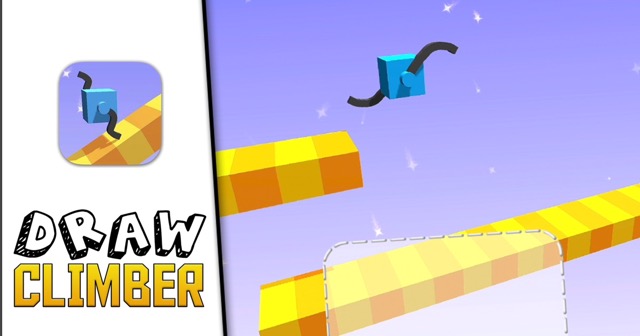
Drag (mouse or touch): Draw leg shape in the frame
Release: Finalize current leg shape
Redraw: Replace the current leg shape with a new one
High Score Tips
Start with tall, wide legs for slope terrain — on steep slopes, leg height helps maintain upward momentum without the cube's body dragging. Two tall rounded legs are a reliable starting point for slope climbing that can be refined from experience.
Experiment freely in early levels — Draw Climber's early terrain is forgiving enough to try unusual shapes without significant penalty. Use early levels as a design playground to develop intuition for how different shapes interact with different surface types.
A circular or wheel shape is your fastest flat-terrain option — on flat surfaces, a circular leg (essentially a wheel) produces the smoothest, fastest rolling motion. Identify flat terrain sections and switch to wheel-like designs there before switching back to appropriate designs for the next terrain challenge.
Draw Climber
Play Draw Climber online free at racing-limits.io. Jump into instant browser gameplay with no downloads.
Draw Climber is a physics puzzle game built around one genuinely original mechanic: you draw the legs that your character uses to move. The character cube doesn't move on its own — it moves according to the shape you draw beneath it, and the shape you draw determines how it handles everything the terrain throws at it. Draw a tall pair of legs and your cube walks over obstacles; draw a wheel and it rolls quickly across flat terrain; draw a flat base and it slides along smooth surfaces. The right leg shape for one terrain type may be completely wrong for the next.
The game's creativity comes from the freedom to invent new solutions. There are no pre-defined correct leg shapes — the physics engine interprets whatever you draw and attempts to use it as locomotion. This produces a design space that encourages experimentation: players who try unusual shapes often discover that something unexpected works surprisingly well in a specific terrain context. The game is genuinely different from any other physics platformer because the solution set isn't fixed — your imagination, and the physics engine's interpretation of it, is the solution set.
The terrain variety is what drives the leg design challenge across the game's levels. Steep slopes require legs with enough height or rotational properties to maintain upward momentum. Stairs need a shape that can catch each step rather than sliding off the edges. Narrow gaps require precision that wide leg shapes can't achieve. Slippery surfaces need maximized contact area. And moving obstacles require designs that are stable enough to handle unexpected lateral contact without the cube flipping over. Draw Climber is the rare game where the creative act of designing something and the competitive act of using it to win are the same action — and where getting better at the game means getting better at creative problem-solving under physical constraints.
Key Details:
Genre:
Physics Puzzle / Creative Design
Difficulty Level:
Easy start, Hard in complex terrain combinations
Average Play Time:
10–20 minutes per session
Best For:
Creative players who enjoy experimental physics games, puzzle fans who want design-based problem solving, and casual players who appreciate the game's humor and variety
How to Play Draw Climber?
Getting Started:
Before the run begins or when prompted, draw a leg shape in the drawing frame — use mouse drag or finger touch to create any shape you want.
The cube begins using your drawn shape to move through the terrain — watch how the shape performs and assess its effectiveness.
When the terrain changes and your current leg shape becomes ineffective, redraw the legs to a shape better suited to the new terrain type.
Reach the finish line as quickly as possible — speed determines your performance score.
If the cube becomes stuck, flipped, or unable to proceed, redraw with a shape that addresses the specific obstacle preventing forward movement.
Basic Controls:
Input
Action
Drag (mouse or touch)
Draw leg shape in the frame
Release
Finalize current leg shape
Redraw
Replace the current leg shape with a new one
Objective: Get the cube from start to finish as quickly as possible by drawing leg shapes that work effectively across each level's terrain. Adapt your design when terrain changes make the current leg shape ineffective. The level ends at the finish line — your speed determines your performance rating.
Draw Climber Game Features & Highlights
Freeform leg drawing — draw any shape imaginable as your character's legs, with the physics engine interpreting and using whatever you create
Mid-level shape redesign — redraw legs at any time during the run to adapt to new terrain challenges
Diverse terrain types — steep slopes, stairs, narrow gaps, inclined bridges, slippery surfaces, and obstacle courses each favor different leg designs
Creative problem-solving format — no fixed correct answers; experimentation and discovery are core to the game experience
Obstacle variety — hammers, moving obstacles, and shaking rails require shapes that are stable enough to withstand unexpected lateral forces
Draw Climber Tips & Strategies
Beginner Tips:
Start with tall, wide legs for slope terrain — on steep slopes, leg height helps maintain upward momentum without the cube's body dragging. Two tall rounded legs are a reliable starting point for slope climbing that can be refined from experience.
Experiment freely in early levels — Draw Climber's early terrain is forgiving enough to try unusual shapes without significant penalty. Use early levels as a design playground to develop intuition for how different shapes interact with different surface types.
A circular or wheel shape is your fastest flat-terrain option — on flat surfaces, a circular leg (essentially a wheel) produces the smoothest, fastest rolling motion. Identify flat terrain sections and switch to wheel-like designs there before switching back to appropriate designs for the next terrain challenge.
Advanced Strategies:
Design for stability, not just propulsion — a leg shape that moves the cube quickly but produces instability (tipping, rotation, flipping) is less effective than a slightly slower shape that maintains the cube's upright position consistently. Stability-first design produces fewer emergency redraws and more consistent speed.
Anticipate terrain transitions before they arrive — levels with visible terrain layouts allow you to see what's coming and design legs suited for the next section before you've fully exited the current one. Switching to a new design at the boundary of two terrain types rather than mid-way into the new terrain produces cleaner transitions.
Stairs-specific designs need angular tips — stairs require legs that can catch each step rather than slipping off the edges. A design with slightly angled or pointed tips that can hook into the vertical faces of stair steps produces far more reliable stair climbing than smooth rounded legs.
What to Watch Out For:
Over-complex designs that destabilize the cube — drawing elaborate, intricate leg shapes is tempting but often counterproductive. Complex shapes that extend in multiple directions create multiple uncontrolled contact points that can tip, flip, or rotate the cube unpredictably. Simpler shapes that are specifically suited to one terrain type usually outperform complex shapes that try to handle everything.
Hammers and moving obstacles that knock the cube over — some terrain sections include horizontal impact hazards. Leg designs with a wide base that lowers the cube's center of gravity are more resistant to lateral knockover than tall, narrow designs. When a hammer or moving obstacle section is visible ahead, redesign toward wider, lower shapes.
Draw Climber Game Elements Explained
Freeform Drawing Physics: The drawing system in Draw Climber creates a genuinely open design space — unlike games where character abilities are chosen from a fixed menu, your character's movement capability is whatever you draw and whatever the physics engine can do with it. The physics engine interprets drawn shapes as solid objects with physical properties determined by the drawing's geometry: tall narrow shapes generate vertical reach; wide flat shapes maximize surface contact; curved shapes produce rolling motion; angular shapes create leverage points that can catch and push against terrain features. The relationship between drawing geometry and physical behavior is learnable but not perfectly predictable — which is partly what makes the game enjoyable. Every new drawing is a small design experiment, and the terrain's response to it provides immediate physical feedback about whether the design addressed the terrain's specific challenges.
Terrain System: Draw Climber's terrain variety is the game's primary driver of design challenge across its levels. Each terrain type has specific physical demands that favor specific leg geometries. Steep slopes favor tall legs that can generate enough leverage to push the cube upward without the body dragging on the slope surface. Stairs favor angular designs with tip geometries that catch on step risers rather than sliding off the step faces. Narrow gaps require precision designs that can fit within the gap's width while maintaining enough height to traverse the gap's full length. Slippery surfaces (low friction) favor wide, flat designs that maximize contact area and minimize the sliding that reduces forward propulsion. Bridge sections require designs stable enough to handle the bridge's lateral movement without the cube losing balance. Each terrain combination in more complex levels requires a design that balances multiple terrain demands simultaneously.
Obstacle Interaction: The obstacles in Draw Climber — hammers, moving platforms, shaking rails — introduce force dynamics beyond the terrain's passive physical properties. A hammer that swings down onto the cube applies a downward or lateral force; a moving obstacle that contacts the cube applies a force in its direction of motion; a shaking rail applies oscillating forces that destabilize any design without a wide enough base. Understanding how these dynamic forces interact with your drawn leg shape is necessary for designing shapes that can withstand obstacle contact without toppling. The key physical principle is center of gravity: designs with wide bases and lower effective centers of gravity resist tipping better than tall, narrow designs under the same lateral force. Designing for obstacle stability requires thinking about force resistance, not just terrain propulsion.
Draw Climber Frequently Asked Questions
Q: How do I draw legs in Draw Climber? A: Use mouse drag on desktop or finger touch on mobile to draw a shape in the drawing frame provided at the start of each run or when terrain changes prompt a redesign. The cube will immediately begin using the drawn shape as its locomotion legs. Release to finalize the drawing.
Q: What happens if my cube gets stuck or flips over? A: Redraw your legs — create a new shape that addresses whatever problem the current design couldn't handle. If the cube is flipped, a design with a lower center of gravity (wider base) may prevent further tipping; if it's stuck on an obstacle, a design with more height or different tip geometry may provide the leverage needed to continue.
Q: Is there a "best" leg shape in Draw Climber? A: No — different terrain types favor different shapes, and no single design works optimally across all terrain combinations. Circles work best on flat surfaces; tall legs work best on slopes; angular designs work best on stairs. Adapting your design to each terrain section rather than using one universal shape produces better performance.
Q: Is Draw Climber compatible with mobile devices? A: Yes — Draw Climber's drawing mechanic translates naturally to finger touch on mobile touchscreen devices. Draw leg shapes by dragging your finger in the drawing frame. The game is fully playable on mobile browsers.
Q: How is my performance scored in Draw Climber? A: Performance is primarily scored by speed — how quickly your cube reaches the finish line from the start. Faster completion (fewer redraws, more terrain-appropriate designs, smoother transitions) produces better performance scores. Some implementations may also score on style or specific challenge completions.
Related Games Like Draw Climber You Might Enjoy
If you like Draw Climber, you might also enjoy:
Black Holeio - It is another easy-to-start browser game with strong replay value.
Wormateio - It is another easy-to-start browser game with strong replay value.
Roshambo - It is another easy-to-start browser game with strong replay value.

 Drift Frenzy
 Drift Rush
 Arcade Glide
 Track Dash
 Retro Rush
 Escape Road 3
 Wave Rider
 Traffic Road
 Escape Road City 2
 Bike Xtreme
 Escape Road 2
 Traffic Rally
 Tap Drift
 Drive Mad
 Wheelie Master
 Wheelie Party
 Moto X3M
 Street Wheelie
 Car Chaos
 Escape Drive
 Blocky Rider
 Mad Pursuit
 Mad Racers
 Chase Rush
 Smashy Road
 Driftio
 Night City Racing
 Hill Climb Racing
 Drift Hunters
 Smash Karts
 GT Cars Mega Ramps
 Motorcycle Racer Road Mayhem
 Funny Mad Racing