Drag (mouse or finger): Draw connection between identical icons
Release: Complete chain and score
High Score Tips
Always look for the longest available chain before connecting a short one — releasing a two-icon connection when a five-icon chain of the same type was available nearby wastes both the scoring opportunity and the Fever meter contribution. Scan the full grid for chain extension opportunities before committing to any connection.
Fever meter filling is your primary strategic goal — the Fever multiplier is where the game's highest scores are generated. Every connection decision should be evaluated against its Fever meter contribution: a longer chain that fills the meter partially is often more valuable than two shorter chains that fill it less efficiently.
Bends cost turns — the path validity system limits how many direction changes a single chain can use. Before starting a chain, trace the path mentally to confirm the bend count is within the allowed limit. A visually accessible chain that requires too many turns isn't actually available.
Link Link
Play Link Link online free at racing-limits.io. Jump into instant browser gameplay with no downloads.
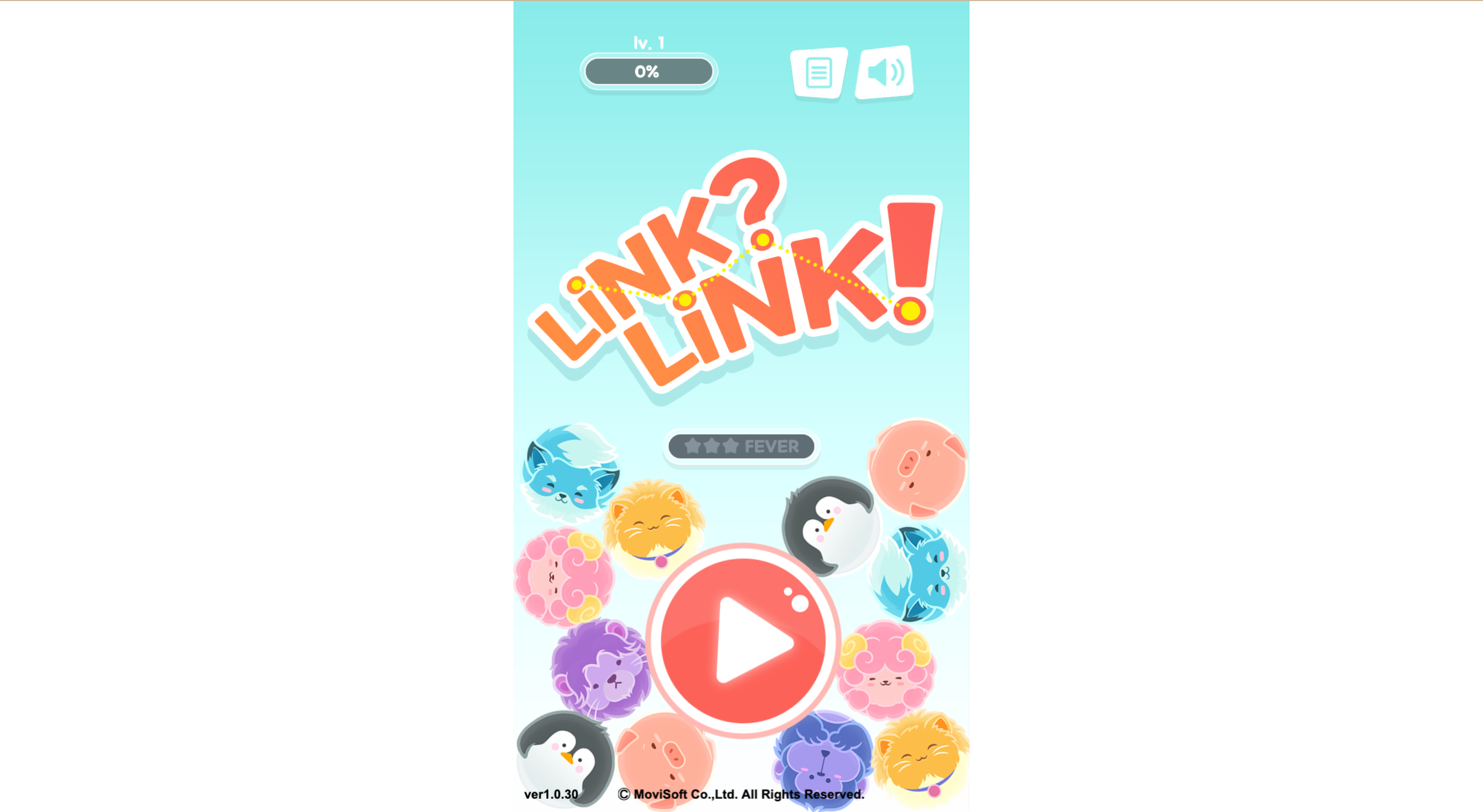
Link? Link! is a connection puzzle game built around the specific satisfaction of linking identical icons in chains — finding a matching pair, then extending the chain to include more identical icons in sequence, watching the combo multiplier climb as your chain grows longer. The grid is filled with colorful creature icons, the connections must follow valid path rules, and the Fever mode that activates from sustained high-chain play provides an explosive scoring window that can define an entire level's outcome.
The game stands apart from standard match-3 formats through its chain-building mechanic. Rather than swapping adjacent tiles to create groups, you draw a connection path between identical icons — horizontally, vertically, or with bends — as long as the path is unobstructed and the turn count remains within the allowed limit. The longer the chain you build before releasing, the larger the score multiplier and the faster the Fever meter fills. This chain-extension incentive is what gives Link? Link! its distinctive risk-reward tension: stopping at a short chain is safe but inefficient; extending the chain further produces higher rewards but risks losing the connection if an obstacle blocks the intended path.
Fever mode is the game's highest-leverage mechanic. The Fever meter fills with each successful connection chain and, when full, activates a timed window where every action multiplies, combos trigger more easily, and the visual presentation signals that the scoring is operating at a different level entirely. Managing your connection chains to fill the Fever meter optimally — building long chains rather than many short ones to accelerate meter filling — is the strategic depth that separates high scorers from players who treat each connection as an isolated decision. Link? Link! rewards players who think in Fever cycles rather than individual chains.
Key Details:
Genre:
Connection Puzzle / Chain Matching
Difficulty Level:
Easy start, Medium–Hard in later levels
Average Play Time:
10–20 minutes per session
Best For:
Casual and mid-core puzzle players who enjoy chain-building mechanics, Fever mode scoring, and cute visual design
How to Play Link Link?
Getting Started:
Drag from one icon to an identical icon to begin a connection — continue dragging to extend the chain through more identical icons.
Valid connections must follow a clear path without obstacles, and bends in the path count against the allowed turn limit.
Release your drag to complete the chain — all connected icons are cleared, points are scored, and the Fever meter fills proportionally to chain length.
Build chains as long as possible to maximize combo effects and accelerate Fever meter filling.
Achieve the level's required point total or complete the required number of Fever activations to clear each stage.
Basic Controls:
Input
Action
Drag (mouse or finger)
Draw connection between identical icons
Release
Complete chain and score
Objective: Score the required points or complete the required Fever activations in each level by connecting identical icons in chains. Longer chains score more and fill the Fever meter faster. Fever mode activates when the meter is full, providing a high-multiplier scoring window that is decisive in high-level play.
Link Link Game Features & Highlights
Chain-extension mechanic — connections extend through multiple identical icons in sequence, with combo multipliers that grow with chain length
Fever mode system — a meter that fills with successful chains and activates a timed high-multiplier scoring window when full
Path-validity rules — connections must follow clear unobstructed paths with a limited number of turns, adding spatial reasoning to the chain-building challenge
Dual level objectives — point-total and Fever-completion objectives create different strategic priorities per level
Cute creature visual design — colorful, engaging icon set that makes the chain-following experience visually satisfying
Link Link Tips & Strategies
Beginner Tips:
Always look for the longest available chain before connecting a short one — releasing a two-icon connection when a five-icon chain of the same type was available nearby wastes both the scoring opportunity and the Fever meter contribution. Scan the full grid for chain extension opportunities before committing to any connection.
Fever meter filling is your primary strategic goal — the Fever multiplier is where the game's highest scores are generated. Every connection decision should be evaluated against its Fever meter contribution: a longer chain that fills the meter partially is often more valuable than two shorter chains that fill it less efficiently.
Bends cost turns — the path validity system limits how many direction changes a single chain can use. Before starting a chain, trace the path mentally to confirm the bend count is within the allowed limit. A visually accessible chain that requires too many turns isn't actually available.
Advanced Strategies:
Enter Fever mode with a pre-planned high-value chain ready — Fever mode multiplies the value of connections made during its window. Identifying a long chain you haven't used yet and holding it to execute as the first action in Fever mode produces a multiplied long-chain score that can be significantly higher than the same chain executed outside Fever.
Chain through central grid positions — icons in the center of the grid have more adjacent identical icons available for chain extension in more directions than edge-positioned icons. Building chains that pass through central areas tends to produce longer connections than chains that hug the grid's perimeter.
In Fever completion levels, prioritize Fever speed over immediate score — when the objective is completing a specific number of Fever activations rather than reaching a point total, optimizing for Fever meter filling rate (long chains over many short chains) is more effective than optimizing for per-connection points.
What to Watch Out For:
Grid locks where no connections remain — if the grid reaches a state where no identical icons have a valid connecting path between them, the level may effectively be over even if icons remain. Prevent this by maintaining awareness of which icon types are becoming isolated as connections deplete the grid.
Overextending a chain past a blocking obstacle — the path-validity system prevents connections through blocked positions. Starting a chain intending to extend it in a specific direction and then discovering a block requires a different chain path that may significantly reduce the chain's total length.
Link Link Game Elements Explained
Chain Connection System: The connection mechanic in Link? Link! is the foundational skill the game develops. Dragging from one icon to an identical icon establishes the connection start; continuing to drag through additional identical icons of the same type extends the chain; releasing completes it. The path the drag follows must be clear — no obstacles blocking the route — and the number of direction changes (bends) in the path is limited. These constraints together mean that the full set of valid connections on any given grid state isn't immediately obvious: some icon pairs that appear visually close may be path-blocked or bend-limited, while some pairs that appear far apart may have clear low-bend paths. Developing rapid visual path assessment — identifying which connections are valid and which are blocked before starting to drag — is the core skill that produces efficient chain-building.
Fever Mode System: Fever mode is Link? Link!'s highest-impact mechanic and the system that creates the game's most strategic decisions. Every successful chain connection contributes to the Fever meter in proportion to the chain's length — a longer chain fills the meter faster than an equivalent number of shorter chains covering the same number of icons. When the meter reaches maximum, Fever mode activates for a brief window during which every connection produces multiplied points, combos trigger more readily, and visual effects signal the mode's elevated scoring level. The strategic depth of Fever mode comes from its planning dimension: knowing that Fever is imminent, and choosing which chains to save for the Fever window versus which to use immediately, is the decision that most directly affects total score. Players who activate Fever and then execute only short chains during the window underperform players who had long chains ready to deploy precisely when the multiplier activated.
Level Objective System: Link? Link!'s dual objective system creates meaningfully different strategic contexts across its levels. Point-total objectives require accumulating a specified score within the level's time or turn limit — in these levels, every connection's immediate score contribution matters, and Fever mode is valuable primarily for its score multiplication effect. Fever-completion objectives require activating Fever mode a specified number of times — in these levels, the priority shifts from maximizing individual connection scores to optimizing Fever meter filling rate through consistent long-chain building. The different optimization targets of these two objective types require different board-reading approaches, preventing any single connection strategy from being universally optimal and keeping the gameplay fresh across different level configurations.
Link Link Frequently Asked Questions
Q: How do I connect icons in Link? Link!? A: Drag from one icon to an identical icon — then continue dragging through additional identical icons to extend the chain. Release when you've built the chain you want, or at the longest point your valid path allows. The connection must follow a clear path without obstacles, and the number of direction changes is limited.
Q: What is Fever mode and how do I activate it? A: Fever mode is a high-multiplier scoring window activated when the Fever meter reaches its maximum. Fill the meter by making successful chain connections — longer chains fill it faster. When the meter is full, Fever activates automatically and every connection during the window produces multiplied scores and easier combo triggers.
Q: Why can't I connect two identical icons that are close together? A: Two identical icons are only connectable if there's a clear, unobstructed path between them with no more than the allowed number of bends. Icons that appear visually adjacent may still be path-blocked by other icons or may require too many direction changes for a valid connection. Trace the path mentally before attempting a connection.
Q: Is Link? Link! compatible with mobile devices? A: Yes — Link? Link! uses drag-to-connect controls that translate naturally to finger touch on mobile devices. Drag your finger from one icon to identical icons to build a chain and lift your finger to complete the connection.
Q: How many points do I need to complete a level? A: Each level has a specific objective displayed at the start — either a required point total or a required number of Fever activations. The current objective progress is visible during play. Complete the objective to advance to the next level.
Related Games Like Link Link You Might Enjoy
If you like Link? Link!, you might also enjoy:
Black Holeio - It is another easy-to-start browser game with strong replay value.
Wormateio - It is another easy-to-start browser game with strong replay value.
Roshambo - It is another easy-to-start browser game with strong replay value.

 Drift Frenzy
 Drift Rush
 Arcade Glide
 Track Dash
 Retro Rush
 Escape Road 3
 Wave Rider
 Traffic Road
 Escape Road City 2
 Bike Xtreme
 Escape Road 2
 Traffic Rally
 Tap Drift
 Drive Mad
 Wheelie Master
 Wheelie Party
 Moto X3M
 Street Wheelie
 Car Chaos
 Escape Drive
 Blocky Rider
 Mad Pursuit
 Mad Racers
 Chase Rush
 Smashy Road
 Driftio
 Night City Racing
 Hill Climb Racing
 Drift Hunters
 Smash Karts
 GT Cars Mega Ramps
 Motorcycle Racer Road Mayhem
 Funny Mad Racing